Most small sales teams end up with the same setup. A phone system came first, because customers needed a number to call. A CRM came later, once the spreadsheet stopped working. Then someone connected the two, and for a while that was fine.
The problems are quiet at first. A rep takes a call on their cell in the parking lot and it never reaches the CRM. The integration logs that a call happened but not how it went. The promised Thursday callback lives on a sticky note. A manager asks "did anyone speak to the Hendersons this week?" and three people have to check three places to answer.
A CRM with the phone system built in is meant to fix this at the root: one tool owns both the number and the record, so there's nothing to sync. This guide covers what that means in practice, which features matter, how the costs compare, and how to tell whether it's right for your team.
What a CRM with a built-in phone system is
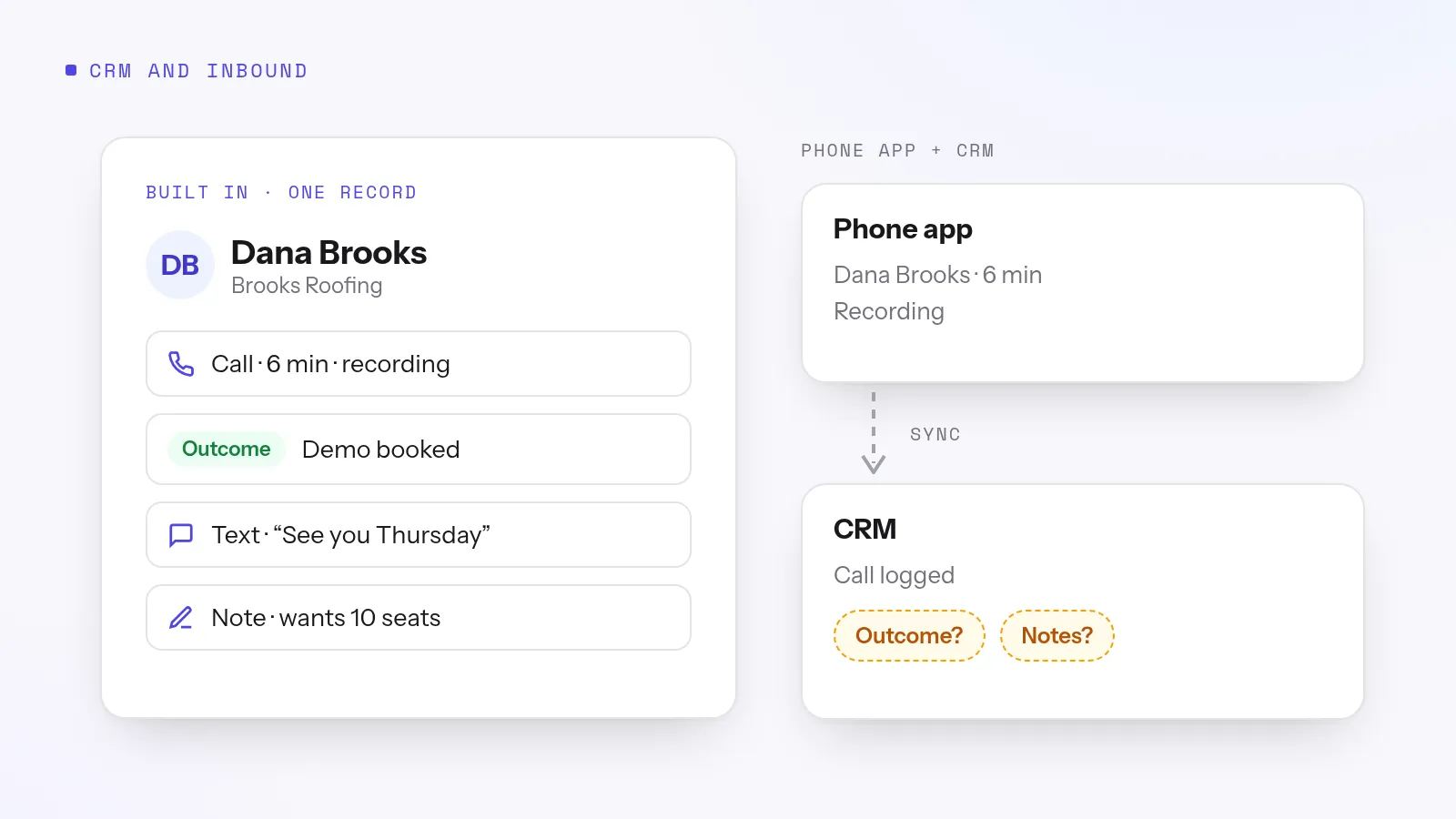
A CRM with a built-in phone system is customer relationship software that also runs your business phone line. The CRM company supplies the numbers, carries the calls, records them and stores them on the contact. Your reps call from the same screen where they read the customer's history, and every call is part of that history the moment it ends.
Plenty of CRMs say "we have calling". That phrase covers three very different setups, and the difference matters more than any feature list.
1. Built in
The CRM vendor runs the phone numbers and the calling itself. There's no second account and no connector. Calls are records in the CRM from the start, so they can't fall out of sync. Adoptiv and Close work this way.
2. Calling add-on
The CRM offers calling inside its screens, but through a telephony partner, and often with a fixed pool of minutes shared across the whole account. It feels built in until the pool runs out or you need something the partner doesn't offer. HubSpot's calling works like this.
3. Phone app plus integration
A separate phone system, such as Aircall or RingCentral, connects to your CRM and copies calls across. You pay two vendors, map fields between them, and depend on the sync. When either tool changes, someone has to fix the connection.
A quick test cuts through the marketing: ask where your phone numbers live. If the answer is "in the other tool", it's an integration, however tightly the two are joined.
What goes missing when the phone and the CRM are separate
Integrations have improved a lot, and for some teams they work well. But a few gaps show up in almost every two-tool setup, and they're worth knowing before you decide.
Calls made outside the phone app. If a rep calls from their personal cell, neither tool knows. This is the most common hole in call history, and it's usually the most important calls that fall into it: the quick follow-up from the car, the customer who rang a rep directly.
The outcome. Most integrations copy the fact of the call: time, length, direction, maybe a recording link. How the call went, and what should happen next, still has to be typed into the CRM by hand. At the end of a long day it often isn't.
The next step. A callback promised on a call is only real if it becomes a task with a date and an owner. When the phone and the CRM are separate, that step relies on memory.
The first conversation. Someone calls before they exist as a lead. The phone system has the call, the CRM has no record to put it on, and by the time the lead is created the link is lost.
Texts. Texts often live in a third app, or on whichever rep's phone sent them. The customer sees one conversation with your company. Your team sees fragments.
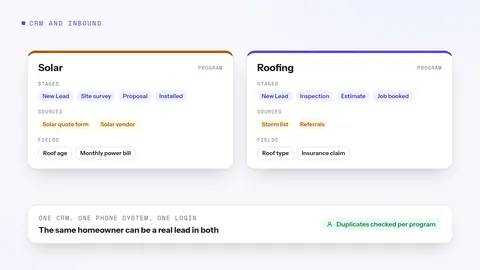
Duplicates. When the phone system creates contacts on its own and the CRM imports them again, the same person ends up in your list twice, each record with half the history.
Picture a typical week. A homeowner calls your main line on Monday and leaves a voicemail. A rep calls back on Tuesday from their cell and promises a quote by Friday. On Thursday the homeowner texts a question to the main number, and someone else answers it. On Friday a manager opens the CRM, sees one voicemail and nothing else, and assigns the lead to a new rep, who calls cold. Nobody did anything wrong. The tools just didn't share what they knew.
The 10 features to check
Not every built-in phone system is equal. These are the ten things that decide whether it'll actually replace your current setup, with the question to put to any vendor.
Feature | What good looks like | Ask the vendor |
|---|---|---|
1. Numbers | A number per rep included, local area codes, toll-free if you need it | How many numbers come with a seat, and what do extras cost? |
2. Calling minutes | Unlimited, or a clear allowance per seat, not a shared pool | What happens when we run out? |
3. Devices | Browser, mobile app and desk phone on the same number | Do calls from the mobile app log the same way? |
4. Automatic logging | Call, length, outcome and recording on the contact as the call ends | What does a rep have to type after a call? |
5. Recording | Every call, both sides, kept long enough to settle a dispute | How long are recordings kept, and on which plans? |
6. Outcomes | A short, required list of call outcomes, with the next step set on the same screen | What happens after a rep picks an outcome? |
7. Texting | Two-way texts from the same number, on the same record as calls | Who handles US texting registration? |
8. Inbound routing | Menus, queues, business hours and callbacks | What happens to a caller when nobody is free? |
9. Dialer | Power or predictive dialing for teams that call lists | Which plan includes it, and how is it billed? |
10. Reporting | Calls, outcomes and deals in the same reports | Can I see calls by rep, outcome and pipeline stage in one place? |
Numbers and minutes
Start with the basics, because they set the bill. You want each rep to have their own number that customers can call back, and calling that doesn't stop mid-month. Watch for two traps. One is a pool of minutes shared across the account, which works until your busiest rep uses most of it. The other is per-minute pricing that looks cheap per call and adds up across a team. If you sell into specific regions, check that you can choose local area codes. Local numbers tend to get answered more often than unfamiliar ones.
Devices
Most reps call from a browser with a headset. But the calls that go missing are the ones made away from the desk, so the mobile app matters more than it looks. The right test: does a call made on the app land on the contact exactly like a call made in the browser? If the app is "just a dialer" that doesn't log, you're back to calls on personal phones.
Automatic logging and outcomes
This is the reason to buy a built-in system at all. When a call ends, the record should already show who, when, how long, which direction, the recording and how it went. The rep's only job should be picking the outcome from a short list and setting the next step while the call is fresh. Some systems run the follow-up from the outcome itself; others put the follow-up on the same screen. Ask which you're getting. If you're building that list, our guide to call disposition codes has ready-made sets for sales, collections, insurance and support.
Recording
Recordings settle disputes, train new reps and back up what the notes say. Check three things: whether every call is recorded on every plan, how long recordings are kept, and whether the two sides are on separate channels. Separate channels mean a transcript can say who said what, which matters the day a customer disputes it.
Texting
Many customers would rather text than pick up, especially after a missed call. Texts should go out from the same number the customer already knows and sit on the same record as the calls. In the US, business texting needs 10DLC registration, so ask whether the vendor files it for you or leaves it to you; 10DLC registration explained covers what it is and what it asks for. Also ask how opt-outs are recorded. What good texting from a CRM looks like day to day is covered in business texting from your CRM.
Inbound routing
If customers call you, the phone system has to decide where every call goes: a menu ("press 1 for sales"), queues with hold music, business hours and holidays, voicemail, and a way out of a long wait. A callback option, where a caller presses a key, hangs up and keeps their place, cuts down the number of people who give up. When the call is answered, the rep should see the caller's history on screen before they say hello.
A dialer, if you call lists
Teams that work through lists of leads lose a lot of time dialing by hand. A power dialer calls the next number as soon as the last call ends; a predictive dialer calls several at once and connects the ones that answer. Dialers are often on a higher plan only, and dialer minutes may be billed separately. If you need one, compare the plan that includes it, not the entry price. For a closer look at how the modes differ, see our guide to power dialers for life insurance, which applies to most outbound teams.
Reporting
Once calls live in the CRM, you can finally answer questions that used to need a spreadsheet: which rep's calls turn into deals, which outcomes come up most at each stage, which lead sources are worth calling. Check that calls, outcomes and deals can sit in the same report.
Built-in vs integrated, side by side
CRM with a built-in phone | Phone app + CRM integration | |
|---|---|---|
Vendors to pay | One | Two, sometimes three with a dialer or AI notes |
What lands on the contact | Call, recording, outcome, texts and notes, as the call ends | Usually the call and a recording link. Outcome and notes depend on the integration. |
Calls from a rep's mobile | Logged if made from the CRM's app | Logged if made from the phone app |
Calls before the lead exists | Can attach by phone number once the lead is created | Often orphaned in the phone system |
Texts | Same number, same record | Depends on the phone app and the sync |
Dialer | Depends on the plan, works from your CRM lists | Usually the phone app's, separate from your lists |
Setup | Sign up, claim numbers, import contacts | Two accounts, an integration, field mapping, and upkeep when either changes |
Where it can fall short | A narrower phone system than a pure telecom vendor | Sync gaps, duplicate contacts, two bills, two logins |
The honest summary: a built-in system wins on completeness and simplicity, and an integrated setup wins on choice. A dedicated phone vendor will often have more telephony options, and a dedicated CRM may have deeper marketing tools. The question is whether you need those extras badly enough to give up a single, complete record.
Who it suits, and who it doesn't
A good fit
Outbound sales teams. Insurance agencies, solar installers, real estate teams and B2B sales teams that call lists every day get the most from it. Every dial, outcome and callback is on the record, and the dialer works straight from the CRM's lists.
Small businesses that take calls. A team of five answering customer calls needs a menu, a queue, business hours and a record of who called. They rarely need a separate contact center platform.
Teams moving off spreadsheets. If you don't have a CRM yet, starting with one that includes the phone avoids building the two-tool problem in the first place.
Managers who want visibility. When every call is on the record, coaching starts from what actually happened rather than what reps remember.
Probably not a fit
Teams locked into another CRM. If your company runs on a CRM that other departments depend on, replacing it to get calling is a big move. A phone app that integrates with it may be the realistic choice.
Large contact centers with specialist needs. Hundreds of agents across sites, workforce management and complex routing may need a dedicated contact center platform, though built-in systems now cover more of this than they used to.
Teams that rely on one specific phone feature. If a particular telephony feature is non-negotiable, check it's on the list before you switch, rather than assuming.
What 10 seats cost
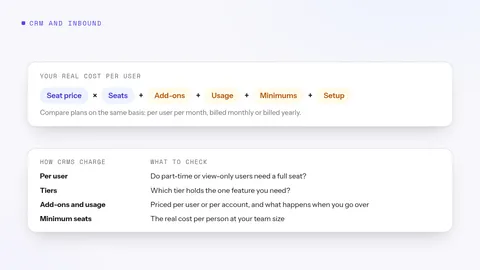
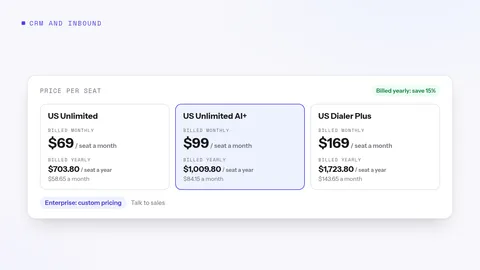
Here's what 10 seats cost each way. Every price below is on annual billing, so the rows compare like for like, and each comes from the vendor's official pricing page as of 29 Nov 2026: Adoptiv, Close, RingCentral, Aircall and HubSpot. HubSpot's page loads its prices in the browser, so we couldn't verify them and mark them "Not publicly verified". Prices are per seat (per user or license) a month, in US dollars, before usage charges such as calls, numbers and texts.
Setup | Per seat a month | 10 seats a month | What's not included |
|---|---|---|---|
Adoptiv US Unlimited (built in) | $58.65 billed yearly ($69 billed monthly) | $586.50 | No AI call notes (they come with AI+); a call queue but no power or predictive dialer; extra numbers and lookups from the wallet |
Adoptiv US Unlimited AI+ (built in) | $84.15 billed yearly ($99 billed monthly) | $841.50 | A call queue but no power or predictive dialer; extra numbers and lookups from a prepaid wallet |
Close Growth (built in) | $99 billed annually ($109 billed monthly) | $990 | Calls and numbers are billed on usage, at the rates on Close's pricing page; AI Call Assistant is a paid add-on at $50 a month per account plus $0.02 per recorded minute. Growth includes a power dialer. |
RingCentral Advanced + HubSpot Sales Hub Starter | $25 paid annually ($35 paid monthly), as RingCentral shows it for 6 to 100 users, + HubSpot not publicly verified | $250 for RingCentral; HubSpot not publicly verified | AI call insights are RingCentral's Conversational Intelligence add-on, which "starts at $60" (no unit given); calls and records meet through an integration |
Aircall Professional + HubSpot Sales Hub Professional | $50 per license billed annually (minimum 3 licenses) + HubSpot not publicly verified | $500 for Aircall; HubSpot not publicly verified | Aircall Professional includes a power dialer and AI call summaries, per its pricing page; calls and records meet through an integration |
On RingCentral's seat price alone, RingCentral plus HubSpot Starter can look like the cheapest line, but HubSpot's share isn't verified here, AI call insights are RingCentral's Conversational Intelligence add-on, which starts at $60, and outcomes still travel through an integration. If your team mostly answers calls and rarely dials lists, though, that pairing can still be the right one. For how Adoptiv's own plans add up at different team sizes, see Adoptiv pricing plans explained, and for CRM seat prices in general, CRM cost per user: what small teams really pay.
Whatever you compare, add up the costs that don't show on the pricing page:
- Onboarding fees, which some CRMs charge on higher plans.
- Per-minute calling beyond any included allowance, across every rep.
- Extra numbers for local presence or separate campaigns.
- AI call notes, often a per-seat add-on.
- A dialer, sometimes a third vendor entirely.
- The integration's upkeep: the hours someone spends fixing a sync or merging duplicates.