
Adoptiv for Android
Your Business Line, in Your Pocket. The business phone and dialer app for Android phones and tablets.
Make and answer calls on your Adoptiv number from anywhere. A call to you rings on your phone and your computer at the same time.
- Android 10 or later
- Phones and tablets
- Signs in with your workspace account
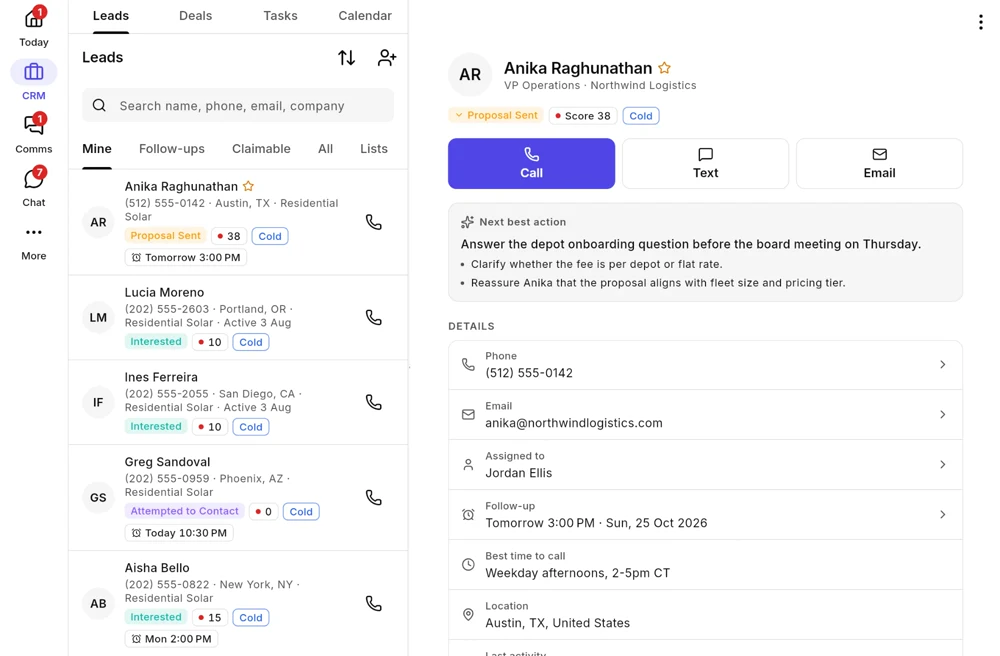
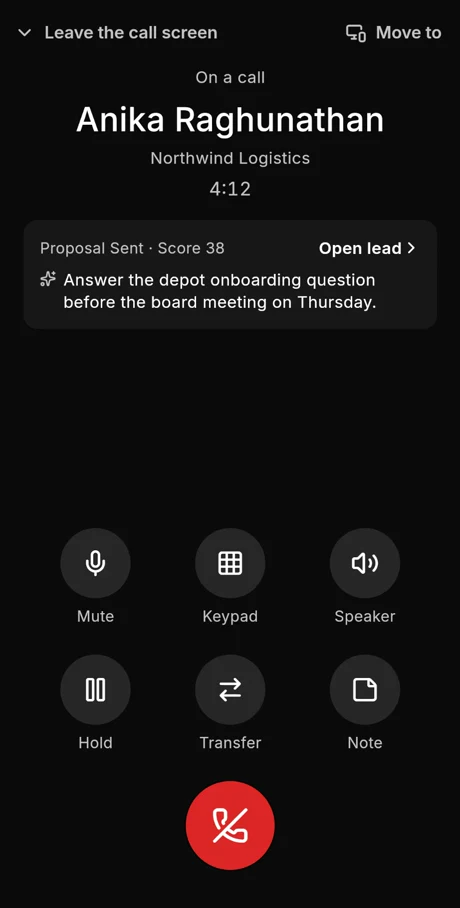
A Full Mobile Dialer, on Your Business Number.
Make and answer calls on your Adoptiv number, so customers see the company, not your mobile.
An incoming call rings on your Android and on your computer at the same time. Answer on either.
Customers only ever see your business number, wherever you call from.
Works on Android phones and tablets running Android 10 or later.
A Business Phone App for Android, on Your Work Number.
The Adoptiv app is a business phone app for Android phones and tablets. It turns your phone into a full mobile dialer on your Adoptiv business number, so you can make and answer work calls anywhere without showing your personal number.

In plain terms it is a softphone app for Android, a VoIP app for Android phones: calls run over your internet connection, Wi-Fi or mobile data, on the same business number you use at your desk. Incoming calls ring on your Android and your computer at the same time, and every call is logged to the contact in your CRM.
That makes it a second phone number app for Android without a second SIM. Keep a work phone number on your personal cell, and customers only ever see the business one. When someone leaves, the number stays with the company, with every past call still on record.
As a business phone app for tablets it suits a front desk or a shared counter too. Unlike a stand-alone business calling app, every call lands on the right contact in your CRM. It needs Android 10 or later. The iPhone app is on its way; until then, iPhone users call from Adoptiv in the browser.
Your Personal Number vs the Adoptiv App.
| What | Calling from your personal mobile | With Adoptiv |
|---|---|---|
| What customers see | Calling from your personal mobile: Your personal number | With Adoptiv: Your business number |
| Call history | Calling from your personal mobile: On your phone only | With Adoptiv: Logged to the contact in the CRM |
| When someone leaves | Calling from your personal mobile: Their customers go with their number | With Adoptiv: The number stays with the company |
| Calls to your work line | Calling from your personal mobile: Missed when you are away from the desk | With Adoptiv: Ring on your phone and your computer |
Installed and Signed in in Three Steps.
Download it on your phone
Open this page on the phone itself and tap Download for Android.
Open the file
Android asks once whether your browser may install apps. Allow it, then tap Install.
Sign in
Open Adoptiv and sign in with the account you use for your workspace.
Almost every phone sold since 2017 takes the main download. If Android says the app is not compatible, or it will not install, your phone needs the 32-bit version. Installing a newer version over an older one keeps you signed in.
Downloads come only from adoptiv.com. To confirm a file is ours, compare its SHA-256 checksum with the one below.
App Questions, Answered.
Is the Adoptiv app on Google Play?
Not yet. Download it from adoptiv.com/download on the phone itself. Android asks once whether your browser may install apps; allow it, then tap Install.
Which Android versions does it support?
Android 10 or later, on phones and tablets. Almost every phone sold since 2017 takes the main download; older 32-bit phones take the 32-bit version.
Do I need an Adoptiv account?
Yes. Sign in with the account you use for your workspace. If your team does not have one yet, start a 14-day free trial.
Is there an iPhone app?
The iPhone app is on its way. Until then, iPhone users can call from Adoptiv in the browser.
How do I get a business phone number on my Android phone?
Start an Adoptiv trial to get a US business number, install the app from adoptiv.com/download, and sign in. Calls to that number then ring on your phone.
Can I have two phone numbers on one Android phone?
Yes. Your personal number stays on your SIM, and your business number runs in the Adoptiv app.
What is a softphone app?
An app that makes and takes phone calls over the internet instead of a phone line. The Adoptiv app is a softphone for your business number.
Does it work over Wi-Fi and mobile data?
Yes. Calls run over any internet connection, Wi-Fi or mobile data.
Still have a question? A real person replies in under 60 seconds in US business hours. Talk to our team →
No account yet?
Get a Business Number and the App Today.
Start a 14-day free trial: every rep gets a US number with unlimited US and Canada calling, on the web and on Android.
14-day trial · no card · migration included