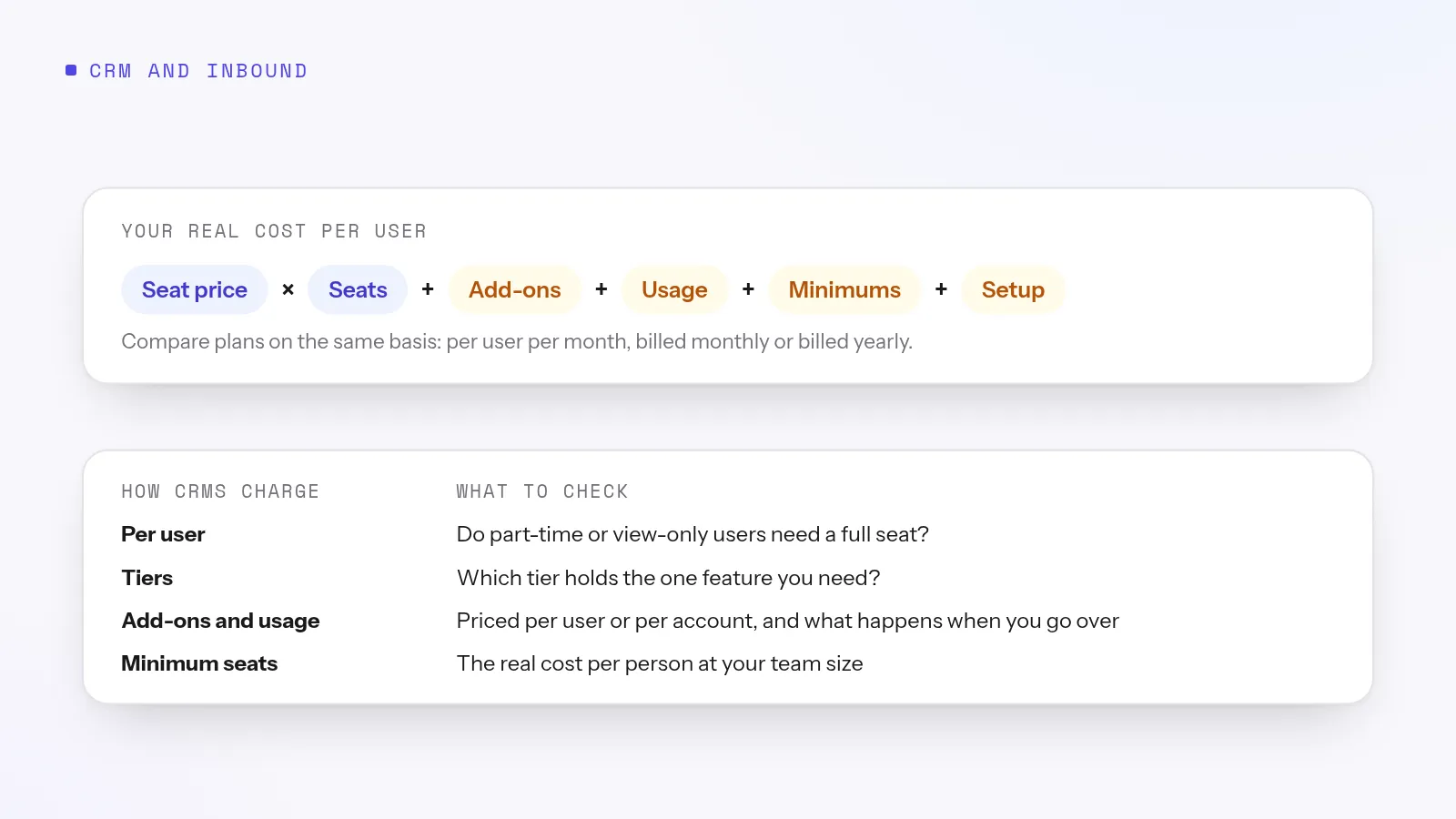
CRM cost per user is the seat price times your seats, plus everything the seat doesn't cover: add-ons, usage, minimum seats and setup. Compare plans on the same billing basis (per user per month, billed monthly or billed yearly), then add the tools you would still have to buy, such as a phone system, before deciding which is cheaper.
Most CRM pricing pages lead with one number per user per month. That number is real, but it's rarely what a small team ends up paying, because the price you see depends on how you're billed and on what sits outside the seat. This post is part of our guide to choosing a CRM with a built-in phone system.
How CRMs charge
Model
How it works
What to check
Per user (per seat)
A fixed price for each person with a login, every month
Whether part-time or view-only users need a full seat
Tiers
Each plan unlocks more features at a higher seat price
Which tier holds the one feature you actually need
Add-ons
Extra modules priced on top of the seat
Whether the add-on is priced per user or per account
Usage
Calls, texts, contacts, storage or automation runs billed as you use them
Published rates, and what happens when you go over
Minimum seats or flat fee
A floor on how many seats you pay for, or one price for the team
The real cost per person at your team size
Monthly vs annual billing
Many vendors show a lower per-user price for annual billing and a higher one for paying month to month. Both are usually written "per user per month", so a quick comparison can set one vendor's annual price against another's monthly price. Always note which one you're looking at, and compare like with like. Annual billing also means paying for the year up front or committing to it, which matters for a team whose headcount changes.
One seat covers the CRM and a business line with unlimited US and Canada calling. Compare every plan's price.
Calling and texting. If the CRM doesn't make calls, you pay a separate phone system per user, and often a connector between the two.
AI features. Call notes, summaries and scoring are often an add-on or a higher tier.
Usage. Extra numbers, dialer minutes and lookups such as Do Not Call checks are commonly billed per use.
Setup and data. Importing your old records, mapping fields and training the team take time even when there's no fee.
Access control. If you need managers to see their team's records but not each other's, check that roles and permissions are in the plan you're pricing.
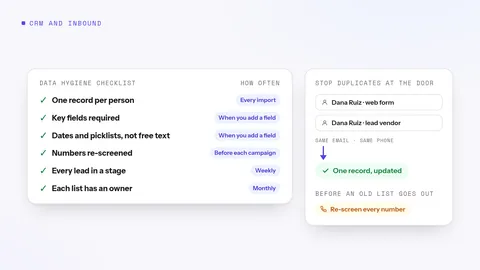
Data quality has a cost too. Duplicates and empty fields waste paid seats on bad calls; our CRM data hygiene checklist and our post on CRM custom fields help you keep records worth paying for.
Working out your real cost
Count the people who need a seat, not everyone who might log in once.
Pick the lowest tier that has every feature you need.
Write down the billing basis for each price: per user per month, billed monthly or billed yearly.
Add every tool you would still buy separately, such as a phone system or call recording.
Estimate usage you'd pay for on top, using only the vendor's published rates.
An example with Adoptiv's prices
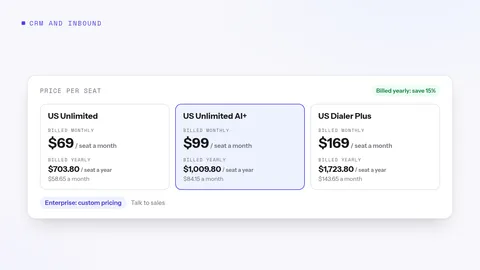
Adoptiv's seat price covers the CRM and the phone system together, and its pricing page lists nothing as an add-on. Every seat includes a US phone number with unlimited US and Canada calling on that number. These are the prices on the pricing page as of 29 Nov 2026, for a team of 5:
Plan
Per seat a month, billed monthly
5 seats, billed monthly
Per seat a year, billed yearly
5 seats, billed yearly
US Unlimited
$69
$345 a month ($4,140 a year)
$703.80 (shown as $58.65 a month)
$3,519.00 a year
US Unlimited AI+
$99
$495 a month ($5,940 a year)
$1,009.80 (shown as $84.15 a month)
$5,049.00 a year
US Dialer Plus
$169
$845 a month ($10,140 a year)
$1,723.80 (shown as $143.65 a month)
$8,619.00 a year
Enterprise
Custom pricing, quoted by sales, on an annual agreement
Prices are in US dollars. Paying yearly saves 15% on each plan, which is $124.20, $178.20 or $304.20 per seat a year. You can also pay month to month with no annual contract. AI+ and Dialer Plus add AI call analysis on each rep's own number, and Dialer Plus adds power and predictive dialing.
What sits outside the seat is paid from a prepaid wallet you top up: extra numbers and calls from them, power and predictive dialer minutes, AI voice-agent minutes beyond your plan's allowance, and lookups such as Do Not Call and litigator checks or lead enrichment, at the rates on your billing page. Everything else in the sales CRM, from contacts and deals to roles and permissions, is part of the seat.
Common questions
How much does a CRM cost per user?+
It depends on the tier, the billing basis and what's outside the seat. Compare the per-user price on the same billing basis, then add the tools and usage you'd pay for on top.
Is annual CRM billing cheaper?+
Usually the per-user price is lower when billed yearly. Adoptiv's yearly prices are 15% below paying monthly, and you can still choose to pay month to month.
What hidden costs should I look for in a CRM?+
A separate phone system, AI add-ons, usage such as calls and lookups, minimum seat counts, and the time it takes to import and clean your data.
Does Adoptiv charge extra for the CRM?+
No. The seat price covers the CRM and the phone system together. Usage such as extra numbers, dialer minutes and lookups is paid from a prepaid wallet.
Adoptiv is the dialer, the CRM and the AI on one platform, where the busywork logs itself and your reps just talk. Try it free for 14 days, with no credit card.
Questions? Call +1 (844) 955-7733. SIYA answers and puts you through to a person.