"AI for phone calls" covers very different products, from a bot that books appointments at 2 a.m. to a summary that saves a rep the typing. Buyers get burned when they treat it as one thing. This guide splits it into the jobs AI actually does on a call, what each is good and bad at, and what to check before you switch it on. Every section links to a deeper guide in our AI on calls series.
The three jobs AI does on a call
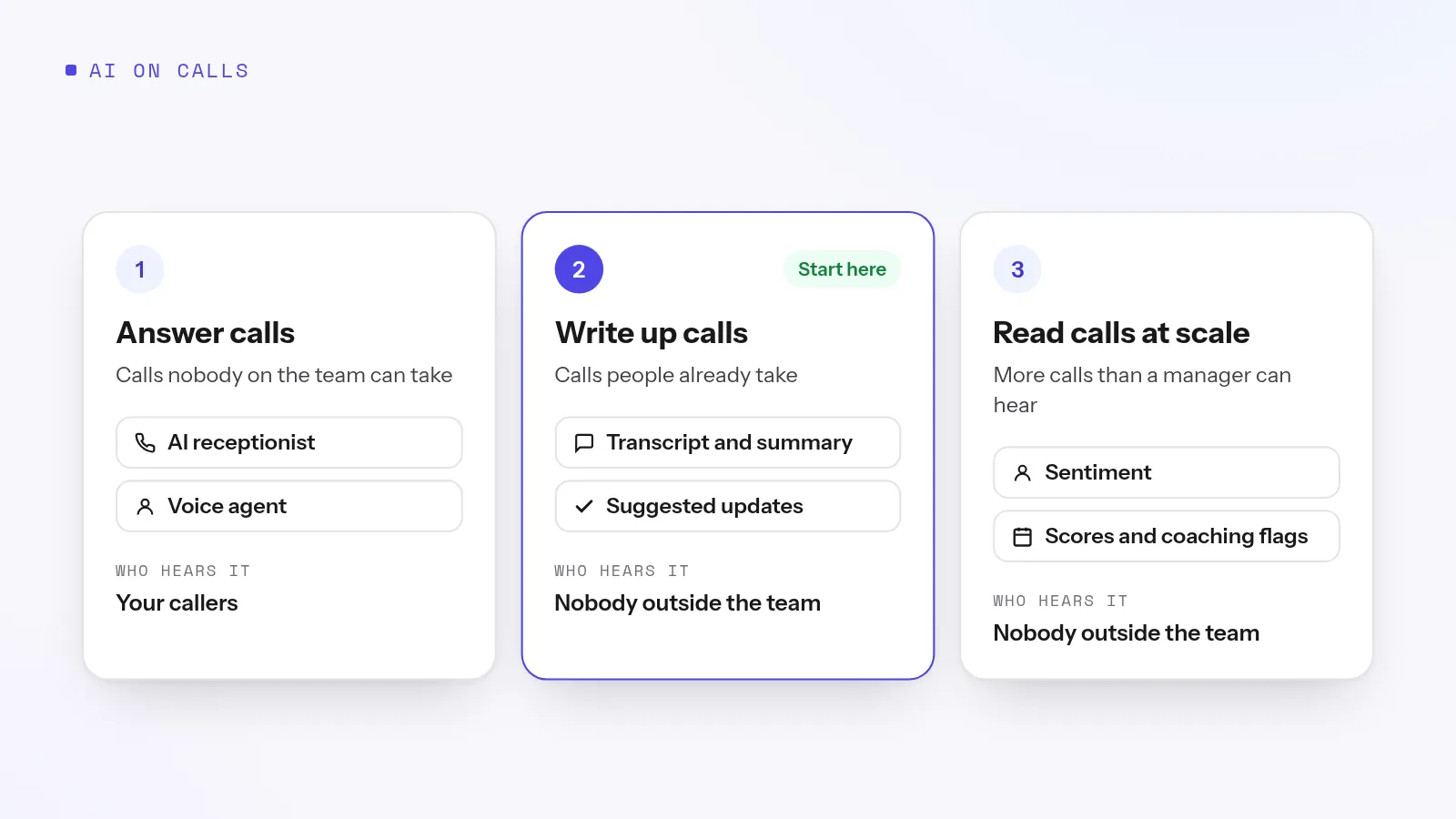
Job | What it replaces | Who hears it | Main risk | Where to start |
|---|---|---|---|---|
Answer calls (AI receptionist) | Voicemail, an answering service, a phone menu | Your callers | Saying something wrong to a customer | After-hours calls only |
Make calls (outbound voice agent) | A rep's first qualifying minute | Your leads | Rules on automated calls; a bad first impression | A small pilot on warm, opted-in leads |
Write up calls (transcripts, summaries) | Notes typed after every call | Nobody outside the team | A summary that misses the point | Recorded calls, on day one |
Suggest record updates | Retyping what the caller said into the CRM | Nobody outside the team | Wrong data saved without review | Suggestions a person accepts |
Read calls at scale (sentiment, scores) | A manager sampling a few recordings a week | Nobody outside the team | Trusting a score more than the call | Use scores to choose calls to review |
The last three jobs never speak to a customer. They work on a recording after the call, which is why they're the safe place to begin. The first two put an AI in front of the people you want to sell to, and they need more setup and more care.
AI receptionists and answering services
An AI receptionist answers your business number, holds a conversation, asks the questions you set and either books the next step or passes the caller to a person. It's the modern version of two older tools: the phone menu ("press 1 for sales") and the human answering service that takes a message and emails it to you in the morning.
The honest comparison is about cost and quality per call. An answering service charges per minute or per call and gives a caller a real human voice, but the message it takes still has to be retyped and called back. A menu is cheap but answers no questions. An AI receptionist answers questions and captures details at any hour, but only as well as the brief you give it.
Trades businesses are the clearest fit, because their phones ring when they're on a roof or under a sink, and a missed call is often a job lost to the next company on the list. Our guide to an AI receptionist for contractors covers what HVAC, plumbing and roofing companies should have it ask: the address, the problem, how urgent it is and the best number to call back. If price is the first question, AI receptionist for small business: what it costs breaks down the usual pricing models and what each one includes. Real estate teams get a different mix of calls, from buyers asking about a listing to sellers wanting a valuation, and our guide to an AI receptionist for real estate teams covers what it should ask each of them and when to pass the call to an agent. Law firms need the most care of all, because an intake call must never sound like advice; AI phone answering for law firm intake covers what it can safely take down.
Three rules make an AI receptionist safe. It answers only from what you give it, never from a guess. It hands the caller to a person the moment they ask for one, or the moment the question falls outside its brief. And every call it takes is recorded and transcribed, so you can read exactly what it said. What goes into that brief, from the greeting to the handover, is in how to write an AI voice agent brief.
AI voice agents on outbound calls
An outbound voice agent places calls, usually to qualify leads before a rep spends time on them: is this still the right person, do they still want a quote, when is a good time for a rep to call. The questions that sort a lead fastest are in AI lead qualification by phone: the questions to ask. Done well, it takes the first sixty seconds off a rep's plate on a list where most connects go nowhere.
Outbound is harder than inbound. The person didn't call you, so patience is short and a robotic first line ends the call. Rules on artificial or prerecorded voices apply to calls an AI places, and consent requirements are stricter than for a human dialing by hand. Run a small pilot on warm, opted-in leads, read every transcript in the first week, and measure the handover rate, not just the connect rate. Our guide to an AI voice agent for outbound calls sets out what it can do and how to run that pilot.
Transcripts and call summaries
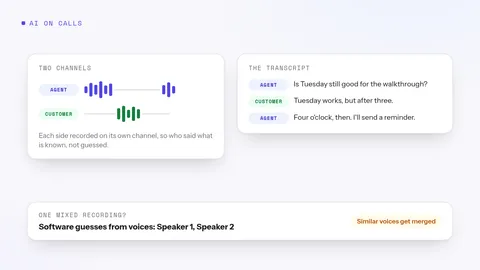
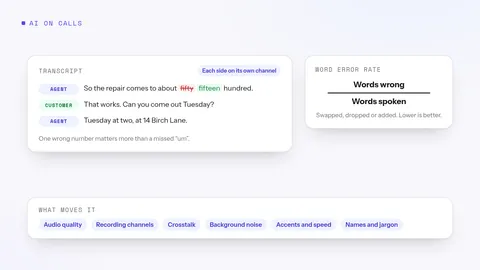
A transcript is every word of the call, ideally split by speaker so you can tell what the rep said from what the customer said. A summary is a few sentences on what happened: why the customer called, what was covered, how it ended and what happens next. They do different jobs. The transcript is evidence, for disputes, compliance checks and coaching; how the speaker split works is in speaker-separated transcripts explained. The summary is for the next person who picks up the record and needs to know where things stand in ten seconds. We cover when you need which in call transcription vs call summaries, and what makes a transcript more or less reliable in call transcription accuracy: what affects it.
A good sales-call summary is short, specific and honest about what it doesn't know. It names the next step and who owns it. It doesn't pad a 40-second call into a paragraph, and it doesn't invent a commitment the customer never made. Our checklist for AI call summaries on sales calls lists what a good one includes and the mistakes to watch for in a trial.
Two settings matter more than the model behind the summary. The first is a minimum call length, so hang-ups and wrong numbers don't fill the record with noise. The second is whether summaries run automatically on every call or only when someone asks, which affects both cost and how fast the record is complete.
After-call work
After-call work is everything a rep does between hanging up and being ready for the next call: notes, an outcome, a follow-up date, a task, a CRM update. On a busy floor it can take a large share of every hour. AI cuts most of it, but not all of it, and the part it shouldn't take is the decision: what was agreed, and what happens next.
The pattern that works is simple. The AI drafts the notes and proposes the changes, and the rep confirms them in a few clicks instead of typing them. Reps who know the AI will write the summary stop scribbling during the call and listen better. Our guide on how to reduce after-call work without losing the notes covers which steps to automate, which to keep with the rep, and how to measure the time saved.
Suggested record updates
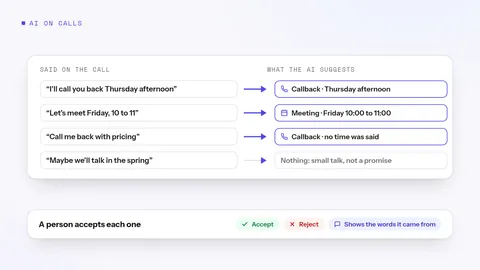
Customers say things on calls that belong in the CRM: a new email, a new job title, "call me after the 15th", "my business partner makes the decision". Without help, most of that never gets typed. AI can catch those details and suggest the change, showing the old value, the new one and the words it came from.
The key word is suggest. An AI that writes straight into your records will eventually save something wrong: a misheard number, a sarcastic "sure, call me every day", a name spelled three ways. Look for a tool where every change waits for a person to accept or reject it, with the quote attached and a record of who accepted it. That keeps the speed and keeps a human answerable for the data. Calls also produce follow-ups, like a callback or a meeting, and AI follow-up extraction: turning calls into tasks covers how those become work someone owns.