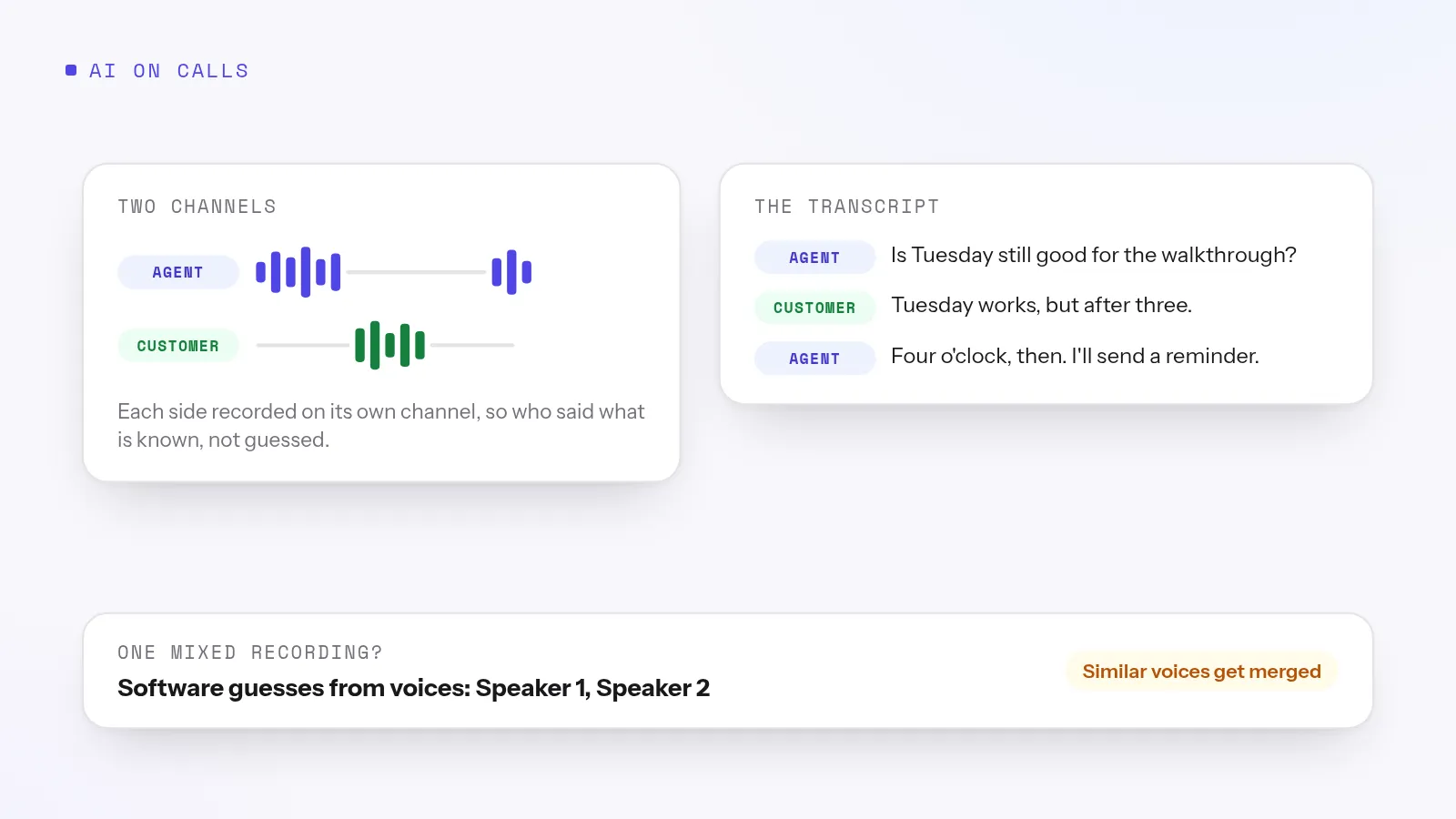
A speaker-separated transcript puts each person's words on their own lines, so you can see who said what instead of reading one block of text. The most reliable way to get it is to record each side of the call on its own audio channel. When there is only one channel, software has to guess speakers from their voices, which works but swaps people more often.
A plain transcript tells you what was said on a call. A speaker-separated transcript tells you who said it, and that second part is what makes a transcript useful for coaching, quality review and AI analysis. This post is part of our guide to AI phone calls.
Two ways to tell speakers apart
There are two common methods, and they are not equally reliable.
Channel separation
Diarization (voice-based)
How it works
Each side of the call is recorded on its own audio channel
Software groups speech by voice in a single mixed recording
Who is who
Known from the channel: agent on one, customer on the other
Inferred, then labeled Speaker 1, Speaker 2
Common errors
Rare; a whole call can come out with the sides reversed
Similar voices merged, short turns given to the wrong person
Best for
Phone calls you record yourself
Meetings and recordings you didn't make
Many phone systems record both sides mixed into one track, which forces the voice-based method. If you have a choice, recording in two channels is the single biggest improvement you can make to who-said-what. Audio quality still matters for the words themselves; our post on call transcription accuracy covers what affects that.
Why it matters
Coaching quotes land on the right person. A note that quotes the customer back at the rep, as if the rep said it, costs a manager credibility fast.
Talk-listen balance is measurable. You can only tell whether a rep talked over the prospect if you know which words were whose.
AI reads the call correctly. A summary or score that mixes up the sides can credit the customer's objection to the rep, or the rep's promise to the customer.
Finding a moment is faster. With each line timed from the start of the call, you can jump to the objection instead of replaying the whole thing.
Try it on your own numbers. On AI+ and Dialer Plus, see who said what on recorded calls on your own number, line by line with times.
Read the customer's lines first. They tell you what the call was actually about, and they're where objections, buying signals and complaints show up. Then read the rep's lines around each of those moments to see how they responded. For a fuller method, see our sales call coaching guide. If you want to see how transcripts feed summaries, sentiment and scores, our overview of conversation intelligence walks through it.
Speaker-separated transcripts in Adoptiv
On AI+ and Dialer Plus, Adoptiv transcribes recorded calls on your own number above a minimum length, with the agent and the customer on separate lines, read from each side's own channel of the call recording (see call transcripts). A new line starts when the speaker changes, and each line keeps its time from the start of the call. If a call ever comes out with the sides swapped, one toggle swaps them for that call only.
You can choose to mask strong language. A transcript can't be edited word by word today. Voicemail transcripts can be searched from the voicemail list. The transcript is also what SIYA reads to write the call summary, judge sentiment and score the call.
Common questions
What is a speaker-separated transcript?+
A transcript where each person's words sit on their own lines, labeled by speaker, instead of one block of text. On a sales or support call, that usually means agent and customer.
What's the difference between diarization and channel separation?+
Channel separation records each side on its own audio channel, so the speaker is known. Diarization guesses speakers from voices in a single mixed recording.
Why are the speakers sometimes reversed?+
On channel-separated calls, the whole call can come out with the sides swapped if the channels were assigned the other way round. In Adoptiv, one toggle swaps them for that call.
Can I edit a transcript in Adoptiv?+
Not word by word today. The transcript stands as it was transcribed, and you can choose to mask strong language.
Adoptiv is the dialer, the CRM and the AI on one platform, where the busywork logs itself and your reps just talk. Try it free for 14 days, with no credit card.
Questions? Call +1 (844) 955-7733. SIYA answers and puts you through to a person.