BPO software for small call centers: what you need per client
Adoptiv Team··Updated ·4 min read
Short answer
A small BPO needs software that keeps each client apart where it matters (numbers, greetings, hours, queues, caller IDs, scoring and reports) while agents work several accounts from one screen. Look for skills-based routing so agents can serve more than one client, screening rules you set up once for every account, QA you can run on any call, and reports you can share with each client's reviewers.
A BPO with 10 to 50 seats has big-center problems on a small-center budget. Each client wants their own greeting, their own numbers and their own monthly figures. Agents sit idle on a quiet account while another client's queue backs up. QA scores a sample, the client scores a different one, and the review turns into an argument. The usual fix, a separate tool or sub-account for each client, multiplies setup and spreads the same compliance rules across several copies that drift apart. This playbook is part of our outbound calling playbooks by industry.
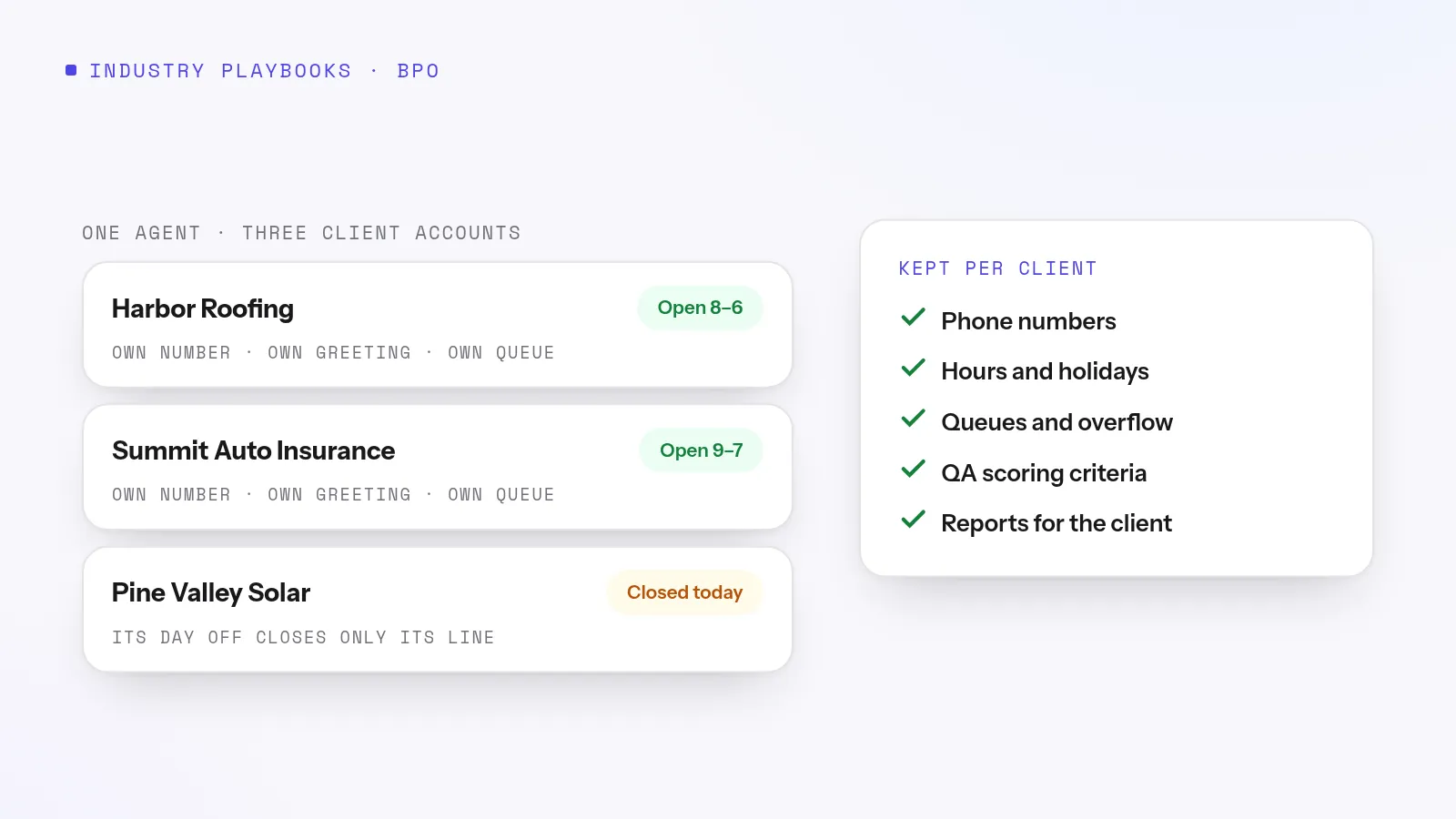
What to set up for each client
Per client
Why it matters
Ask the vendor
Phone numbers
Callers see the client's number, not yours
Can each client have its own local and toll-free numbers?
Greeting, hours, holidays
One client's day off shouldn't close another's line
Can each account have its own schedule?
Queues and overflow
Long waits go to that client's chosen exit
Can overflow differ per client?
Outbound campaigns
Own pacing, caller IDs and abandon limit
Is each client a separate campaign?
Scoring criteria
One client cares about script adherence, another about tone
Can QA criteria differ per client?
Reporting
The client sees the figures for their own account
How do clients see reports, and does each viewer need a login?
What to keep shared
Screening. Blocked numbers, Do Not Call and litigator checks should be one set of rules every client uses. Copying them into each client's setup is how they fall out of date.
Agents. Give agents skills for each account they're trained on, so a quiet account's agents can take a busy one's calls. Our guide to skills-based routing shows how to set the levels.
The screen. Agents shouldn't switch tools or logins between accounts.
Keeping agents busy across accounts
Idle time is a small BPO's biggest hidden cost. Three things help. Skills-based routing lets one agent sit on several clients' queues. Ring strategies such as fewest calls share the load. And between calls, agents can work an account's text messages or callback list instead of waiting for the phone. If most of your clients are HVAC, roofing or solar companies, our guide to home services call center software covers what those accounts need.
Try it on your own numbers. Run every client account from one floor: numbers, call flows and queues per client, screening shared.
Hand-scoring 2% of calls tells you little and starts disputes. Transcribing and scoring far more of them gives you and the client the same evidence. Then share the account's dashboard with the people who review it, so both sides walk into the monthly review with the same numbers instead of a spreadsheet export.
Questions to ask before you buy
Is pricing per seat, per minute or both? What does a 20-seat floor cost in a normal month?
Are there isolated client sub-accounts, or does everything run in one workspace with permissions?
Is there one Do Not Call list across the floor, or one per client?
Does it include workforce management, or will you keep your scheduling tool?
Can it bill by client, or will you work that out from reports?
Which security certifications are complete, and which are in progress? Your clients' questionnaires will ask.
Where Adoptiv fits
Adoptiv's BPO call center software gives each client its own numbers, call flows, queues and caller IDs, with agents serving several accounts through skills-based routing. Outbound campaigns are in early access, with power and predictive dialing on Dialer Plus or Enterprise. Compliance screening checks numbers against federal Do Not Call, known litigators and your own Do Not Call lists, and your lists apply to every account. This is general information, not legal advice, so check with your own counsel. Our multi-client routing recipe puts screening in one shared flow that every number goes through first, then sends each call on to that client's own flow.
AI call analysis gives a transcript split by speaker, sentiment, a score and a compliance reading. It's included on calls on each rep's own number on AI+ and Dialer Plus, and very short calls aren't analyzed. To show a client their results, share a dashboard with a team or CRM role, read-only or with edit access. Everyone who views it signs in. Seats are $69, $99 or $169 per seat a month billed monthly (US Unlimited, AI+, Dialer Plus), or $58.65, $84.15 or $143.65 billed yearly; dialer minutes come from a prepaid wallet.
What it doesn't do, yet: there are no isolated client sub-accounts or white-labeled logins (roles and permissions decide who sees which account). Your Do Not Call lists cover the whole floor, not one client. Forecasting, scheduling and per-client billing aren't built in. The SOC 2 audit is in progress, not complete.
Common questions
What is BPO call center software?+
Software an outsourced contact center uses to run calls for several clients at once: numbers, routing, dialing, recording, QA and reporting for each account.
Do I need a separate system for each client?+
Not usually. One platform with per-client numbers, flows and queues is easier to run and keeps shared rules, such as screening, in one place.
Can clients see their own results?+
In Adoptiv, through a shared dashboard: share it with a team or CRM role, read-only or with edit access. Everyone who views it signs in, so give each client team its own board. There's no client portal with its own logins.
Does Adoptiv keep a separate Do Not Call list per client?+
No. Your Do Not Call lists apply to every account and campaign in the workspace, so an opt-out on one account stops calls on every account.
Adoptiv is the dialer, the CRM and the AI on one platform, where the busywork logs itself and your reps just talk. Try it free for 14 days, with no credit card.
Questions? Call +1 (844) 955-7733. SIYA answers and puts you through to a person.