Auto attendant vs IVR: what's the difference, and which do you need?
Adoptiv Team··Updated ·3 min read
Short answer
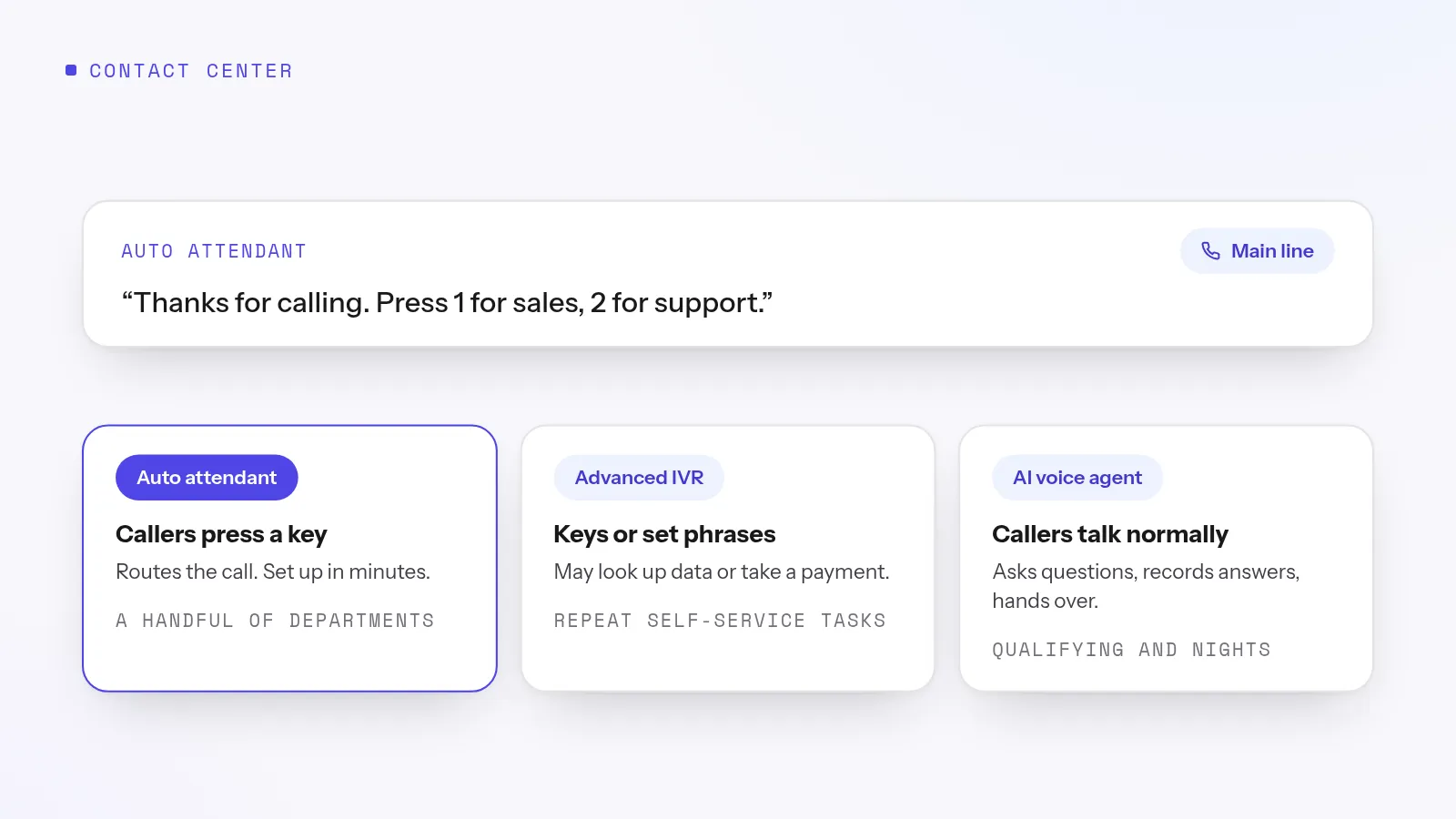
An auto attendant is the simplest kind of IVR: a greeting and a "press 1 for sales, 2 for support" menu that routes callers by key press. "IVR" (interactive voice response) also covers bigger systems that recognize speech, look up account data or take payments. Most small businesses only need an auto attendant. If callers need a real conversation, an AI voice agent fits better than a bigger menu.
The two terms get used interchangeably, and vendors often call a plain menu an "IVR" to make it sound grander. The useful question isn't what it's called but what your callers need to do before they reach a person. Part of our contact center software guide.
Auto attendant vs IVR vs AI voice agent
Auto attendant
Advanced IVR
AI voice agent
What callers do
Press a key
Press keys or say set phrases
Talk normally
What it does
Routes the call
Routes, and may look up data or take a payment
Asks questions, routes or hands over
Setup effort
Minutes
Often a project with a developer
A written brief and some testing
Best for
A handful of departments
High call volume with repeat, self-service tasks
Qualifying callers and answering at night
Main risk
Too many options
Callers trapped in a maze
Answers you didn't plan for
When an auto attendant is enough
Callers want one of two to five places: sales, support, billing, a location.
You want calls to reach the right team without someone answering and transferring each one.
You need different routing after hours and on holidays.
Keep the menu short, put the most common reason first, and let a key press interrupt the greeting so regular callers don't sit through it. Our IVR menu examples include seven scripts you can adapt. Where the menu should send each option is a separate choice, covered in call queue vs ring group.
Try it on your own numbers. Build your first phone menu in minutes, included on every plan.
Callers keep pressing 0. The options don't match why people call.
Every call needs the same questions first, such as name, address and what the job is. A menu can't ask those, but a voice agent can.
You miss calls at night and a voicemail box isn't converting.
Mistakes to avoid
More than five options on one level.
No exit for callers who press nothing or the wrong key.
A long greeting that can't be skipped.
The same menu at 2 am as at 2 pm.
"Please listen carefully, as our options have changed", months after they changed.
How Adoptiv does it
Adoptiv's auto attendant is a keypad menu you build by drag and drop, on every plan. The first key press cuts the greeting short. If a caller presses nothing, by default the menu waits 5 seconds and asks again, up to 3 times, then sends them to the route you chose. A wrong key has its own route too, so nobody loops forever. Any key can open a second menu, and the greeting can be a recording or typed text spoken in a saved voice.
Because the menu is a step in a call flow, you can put it behind your business hours and holiday calendars, so after-hours callers can hear a different greeting and go somewhere else. Callers can't type an extension or say a name, so keep the options short and plain. When callers would rather talk, put SIYA, the AI voice agent, in your call flow. She asks your questions and hands warm callers to your team.
Common questions
Is an auto attendant the same as an IVR?+
An auto attendant is a simple type of IVR. Every auto attendant is an IVR, but an IVR can do more than route by key press.
How many options should a phone menu have?+
Few enough to remember after one listen, usually three to five. Use a second menu level if you need more.
Does a small business need an IVR?+
If more than one person or team takes calls, a simple auto attendant usually pays for itself in calls not transferred by hand.
Can an AI voice agent replace an IVR?+
For routine calls it can, because callers just say what they need. Many teams keep a short menu and put the AI on one option or after hours.
Adoptiv is the dialer, the CRM and the AI on one platform, where the busywork logs itself and your reps just talk. Try it free for 14 days, with no credit card.
Questions? Call +1 (844) 955-7733. SIYA answers and puts you through to a person.